04. Visual Save Studio
Overview
Visual Save Studio is FuzzySave’s flagship editor environment built entirely with Unity’s modern UI Toolkit and UI Builder. It provides a comprehensive, visual command center to configure persistence, inspect live disk files, bind event triggers, and generate high-performance C# code without writing boilerplate.
Open the studio via the Unity menu:
Window > Fuzzy Logic Labs > FuzzySave > Visual Save Studio
1. Dashboard Tab: Visual Mapping & Code Baking
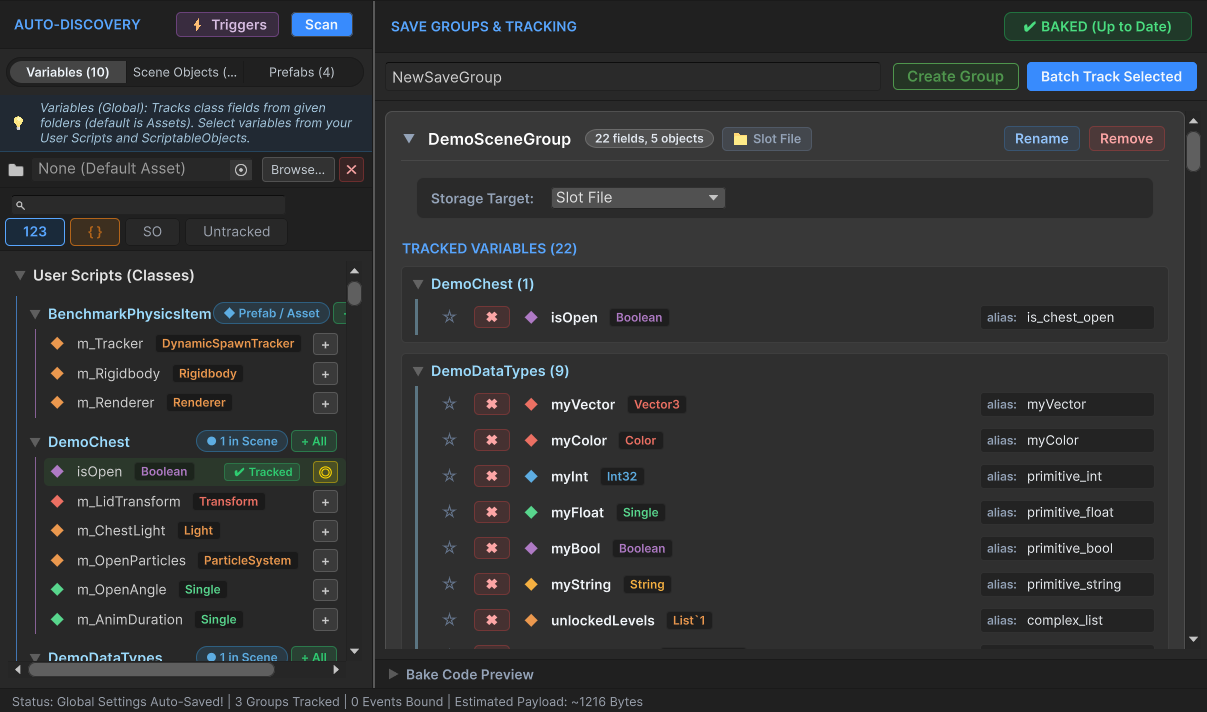
The Dashboard tab is the heart of no-code configuration:
Left Panel: Component & Variable Discovery
- 3 Category Modes:
User Scripts: Scans all custom MonoBehaviour and C# scripts in the project.Engine Components: Scans Unity built-in components (Transform,Rigidbody,Camera,Light, etc.).Save Map: Provides an aggregated list showing which fields are mapped to which save groups.
- Target Folder Filter:
In large projects with thousands of third-party assets, use the folder picker to restrict scanning strictly to your team’s code folder (e.g.,
Assets/MyGame/Scripts). - Data Type Filters: Toggle visibility for
Primitives,Events,Custom Classes,ScriptableObjects, andUntracked Only.
Center Panel: Save Groups (Containers)
- Group your data logically (e.g.,
PlayerGroup,WorldStateGroup,SettingsGroup). - Drag-and-Drop: Simply grab any variable or property from the left panel and drop it onto a Save Group card.
- Aliases: Assign clean, space-saving JSON keys to fields (e.g., in-code
m_CurrentPlayerHealthPointsbecomes"hp"in the save file). - Summary Variable Toggle (
isSummaryVariable): Flagging a field (likelevelorgold) ensures it is extracted intoSaveSlotMetadata.summaryValuesfor display on save slot UI cards without loading the full save.
Right Panel: Group Inspector & Live C# Preview
Configure per-group settings:
- Storage Target:
SlotFile: Bundled into the active slot file (e.g.,slot_1.sav).GlobalFile: Shared global file across all slots (e.g.,global_settings.savfor audio volume and graphics).CustomFile: Saved to a dedicated file pattern.
- Trigger Policy:
ManualOnly,OnSceneChange,OnAppPause,IntervalTimer,OnEventFired. - Encryption & Compression Overrides: Choose whether this specific group overrides global security rules.
- Live C# Preview: Shows the exact C# code that will be compiled.
Zero-Reflection Code Baking (PartialClassEmitter)
Clicking the green “Bake Code” button generates direct getter/setter code in:
Assets/FuzzyLogicLabs/FuzzySave/Runtime/Generated/FuzzySaveGenerated.cs
This eliminates reflection entirely at runtime, delivering native C# speed.
2. Save Explorer Tab: Real-Time Disk File Editor
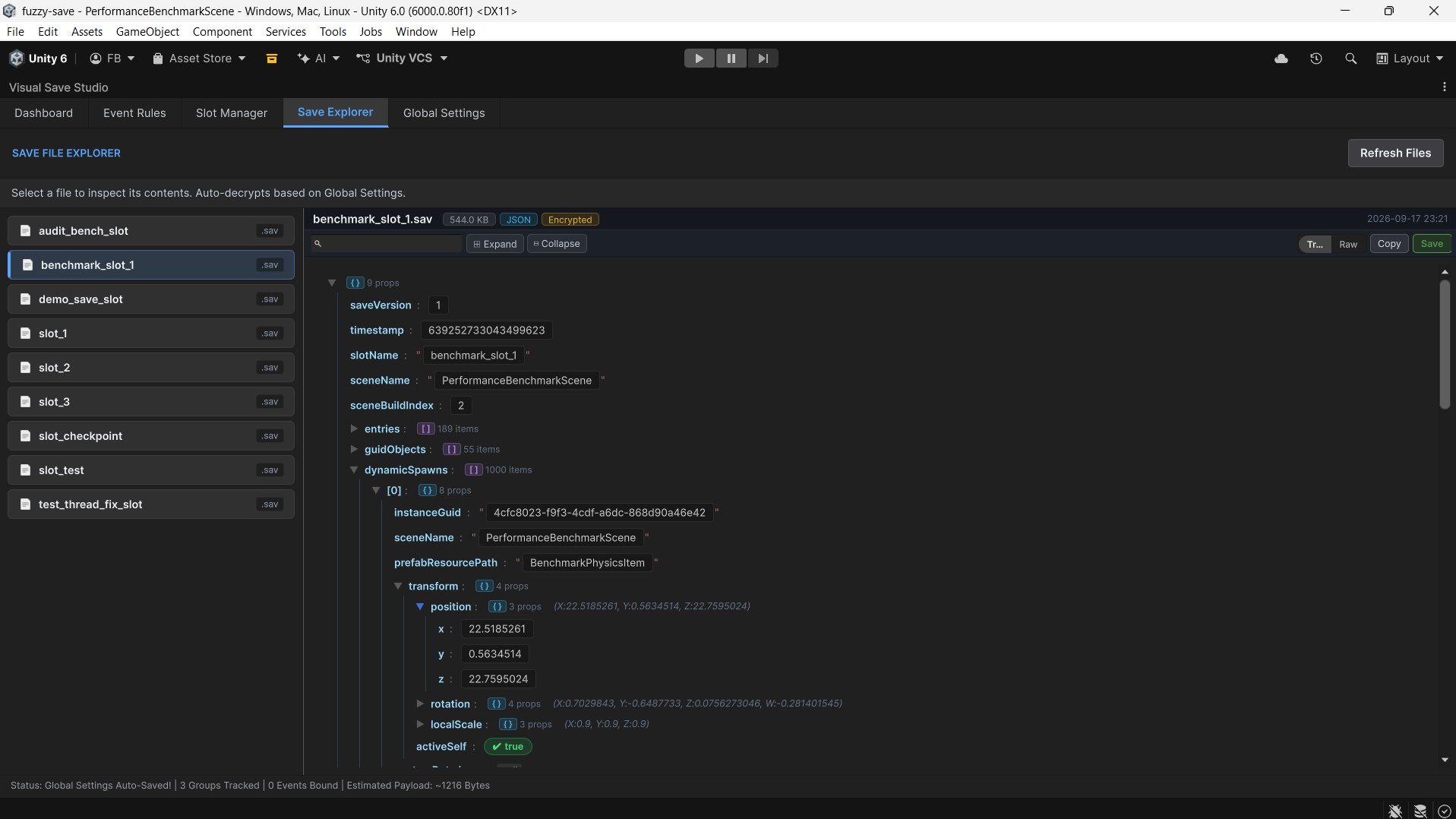
The Save Explorer allows developers and QA testers to inspect, search, and edit disk save files directly inside Unity without needing an external text editor.
Features:
- Dual Viewing Modes:
- Tree Mode: Interactive visual hierarchy with
{ } (n props)and[ ] (n items)badges. - Raw Mode: Direct formatted JSON text editing.
- Tree Mode: Interactive visual hierarchy with
- JetBrains Mono Typography: Integrated custom monospace font for readability.
- Visual Inspectors:
- Color Swatch Preview: Properties with
r, g, b, avalues render an actual interactive color swatch. - Single-Line Vector Preview: Vector objects render concisely as
(X: 1.0, Y: 2.0, Z: 3.0). - Inline Boolean Toggles: Clickable pill buttons to flip
true/falseinstantly. - Inline Numeric/String Inputs: Edit values directly in the tree.
- Color Swatch Preview: Properties with
- Live Search Filtering: Typing in the search bar dynamically filters keys and values, automatically expanding parent branches.
- Save File Button: Writes modifications back to disk using the same atomic, fail-safe pipeline as runtime saves.
- File Metadata Card: Displays file size, format, encryption status, compression ratio, and last modified UTC timestamp.
3. Save Events Tab
Configure automated save triggers without writing code:
- Built-in Triggers:
OnSceneLoaded,OnSceneUnloaded,OnApplicationPause,OnApplicationQuit. - Interval Timers: Set periodic triggers (e.g., save
AutosaveGroupevery 180 seconds). - Custom Event Rules: Bind named game events (e.g.,
"OnBossDefeated","OnQuestCompleted") to specific save groups.
4. Save Slots Tab
Manage physical save files stored on the local machine:
- Displays all detected
.savand.binfiles underFuzzySaveData. - Shows formatted file size, creation date, and last modified timestamp.
- Individual Delete Slot buttons and global Clear All Slots command.
5. Settings Tab
Visual editor for FuzzySaveSettings.asset:
- Configure save directory name (default:
FuzzySaveData). - Toggle default serialization format (
JsonorBinary). - Configure global AES-256 password and GZip compression.
- Enable Graveyard tracking and default destruction action.
- Setup Cloud Synchronization providers and endpoints.
Next Chapter
Proceed to 05. Play Mode Live Debugger to learn how to inspect memory, execute live cheats, and manipulate RAM snapshots while the game is running.