02. Asynchronous Pipeline & Zero-Hitch Architecture
The Core Problem: Why Conventional Systems Stutter
Unity’s rendering loop is bound to the Main Thread. In standard implementations, calling Save() performs the following on the main thread:
- Crawling game objects and reflection reading.
- Converting data structures into large JSON or binary strings.
- Compressing with GZip / Deflate.
- Performing cryptographic hashing and AES encryption.
- Invoking synchronous file disk I/O (
File.WriteAllText).
If the save payload is larger than a few kilobytes, the main thread freezes for 20ms to 250ms+, causing a noticeable dropped frame (lag spike / hitch).
FuzzySave eliminates this with its 3-Phase Asynchronous Pipeline.
The 3-Phase Pipeline Architecture
sequenceDiagram
    autonumber
    participant MT as Unity Main Thread
    participant WT as Worker Thread (Task.Run)
    participant Disk as Disk Storage (.tmp / .bak)
    participant Cloud as Cloud Service Provider

    Note over MT: Phase 1: State Gathering (0.1ms - 1ms)
    MT->>MT: Collect Scene Metadata (Scene Name, Build Index, Ticks)
    MT->>MT: Execute FuzzySaveGeneratedBake (Direct C# Accessors)
    MT->>MT: Snapshot GlobalGuidRegistry Entities (Transforms -> DTOs)
    MT->>MT: Snapshot DynamicSpawnTracker Instances
    MT->>MT: Assemble Deep Copy of SaveContainer

    Note over WT: Phase 2: Processing & Storage (Background Thread)
    MT->>WT: Task.Run(SaveContainerSnapshot)
    WT->>WT: Serialize to JSON or Binary Format
    WT->>WT: GZip Compression (Optional)
    WT->>WT: AES-256-CBC Encryption & PBKDF2 (Optional)
    WT->>Disk: Write payload to [Slot].sav.tmp
    WT->>Disk: Backup existing target to [Slot].sav.bak
    WT->>Disk: Atomic Swap (.tmp -> [Slot].sav)
    WT-->>MT: Notify Completion (WorkerDurationMs recorded)

    Note over Cloud: Phase 3: Cloud Synchronization & Events
    opt Cloud Sync Enabled
        MT->>Cloud: UploadSaveAsync(slotName, payload)
    end
    MT->>MT: Fire OnSaveCompleted(slotName, success)
Phase Breakdown
Phase 1: Main Thread Gathering (~0.1ms – 1.0ms)
Because Unity’s C++ native bindings (Transform, GameObject, Component, SceneManager) can only be touched from the main thread, Phase 1 strictly gathers data and maps it into thread-safe Plain Old C# Objects (POCOs) and DTOs:
- Collects active scene name, build index, UTC timestamp, and playtime.
- Direct C# property reads via
FuzzySaveGeneratedBake. - Converts transforms and rigidbodies into stack-allocated DTO structs (
Vector3DTO,QuaternionDTO,TransformDTO). - Clones a deep copy snapshot of
SaveContainer.
Phase 2: Background Worker Processing (Task.Run)
All CPU-intensive, allocation-heavy, and disk-bound work runs asynchronously on the .NET thread pool:
- Serialization: Full transformation to JSON or Binary without blocking Unity.
- Compression: GZip byte stream compression.
- Encryption: AES-256-CBC with PBKDF2 cached keys.
- Atomic I/O: Flushes to temporary file
.tmp, validates, creates.bakfallback, and atomically swaps file names.
Phase 3: Cloud Sync & Event Dispatch
Once local disk operations conclude:
- The system returns execution safely to Unity’s SynchronizationContext.
- If cloud synchronization is configured,
CloudSyncManagerasynchronously uploads payload bytes in the background. - Global event
FuzzySaveManager.OnSaveCompletedfires on the main thread for UI toast feedback.
Time-Sliced Restoration (Zero-Hitch Loading)
Loading thousands of objects within a single frame can cause an even worse freeze than saving. FuzzySave resolves this using an adaptive Time-Sliced Restoration Engine:
// Excerpt from CoreEngine.cs (LoadAsync)
// 1. Scene GUID Objects: Yield every 500 items to avoid frame hitchesif (s_CurrentContainer.guidObjects != null && s_CurrentContainer.guidObjects.Count > 0){    int guidBatchCounter = 0;    for (int i = 0; i < s_CurrentContainer.guidObjects.Count; i++)    {        var data = s_CurrentContainer.guidObjects[i];        if (GlobalGuidRegistry.TryGet(data.guid, out var targetComp))        {            data.ApplyTo(targetComp);        }
        guidBatchCounter++;        if (guidBatchCounter >= 500)        {            guidBatchCounter = 0;            await Task.Yield(); // Hands frame control back to Unity!        }    }}
// 2. Dynamic Prefab Spawns: Yield every 50 instantiationsif (s_CurrentContainer.dynamicSpawns != null && s_CurrentContainer.dynamicSpawns.Count > 0){    int spawnBatchCounter = 0;    for (int i = 0; i < s_CurrentContainer.dynamicSpawns.Count; i++)    {        var spawnData = s_CurrentContainer.dynamicSpawns[i];        // Instantiate prefab, set GUID, and apply transform & physics...
        spawnBatchCounter++;        if (spawnBatchCounter >= 50)        {            spawnBatchCounter = 0;            await Task.Yield(); // Prevents GC and engine instantiation stall!        }    }}
Cross-Scene Restoration
When loading a save slot created in a different scene, FuzzySave handles scene transitions seamlessly:
flowchart TD
    Start["LoadAsync(slotName)"] --> CheckScene{"container.sceneName == activeScene.name?"}
    CheckScene -- Yes --> RestoreData["Restore GUIDs, Spawns, and Variables"]
    CheckScene -- No --> AsyncLoad["SceneManager.LoadSceneAsync(container.sceneName)"]
    AsyncLoad --> AwaitScene["await Scene Ready (Task.Yield)"]
    AwaitScene --> RestoreData
    RestoreData --> Complete["Fire OnLoadCompleted(slotName, true)"]
If container.sceneName != activeScene.name, FuzzySave:
- Calls
SceneManager.LoadSceneAsync(container.sceneName). - Asynchronously waits until the new scene has fully loaded.
- Automatically maps scene objects and dynamic prefabs to the newly loaded hierarchy.
- Restores character position, inventory, and health without requiring custom scene transition code.
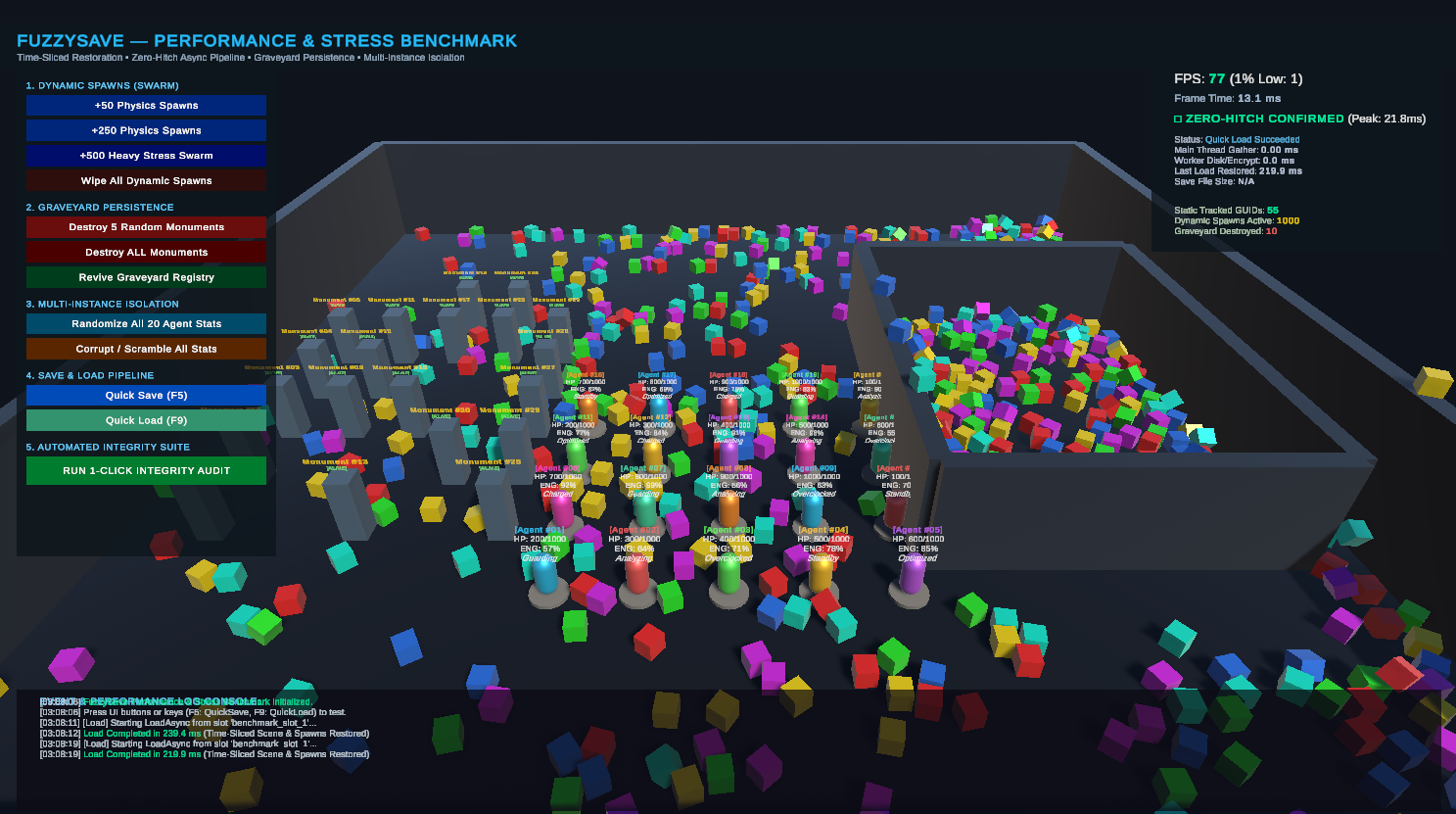
Live Performance Profiling Metrics
FuzzySave exposes real-time profiling metrics directly on FuzzySaveManager:
// Inspect execution timings in millisecondsfloat mainThreadMs = FuzzySaveManager.LastSaveMainThreadGatherMs;float workerThreadMs = FuzzySaveManager.LastSaveWorkerDurationMs;
Debug.Log($"Main Thread Gathering: {mainThreadMs:F2} ms | Background Worker I/O: {workerThreadMs:F2} ms");
Next Chapter
Proceed to 03. Storage, Security & Data Integrity to explore atomic file operations, AES-256 encryption, GZip compression, and HMAC-SHA256 checksums.