08. Slot Metadata & GPU Thumbnails
Overview
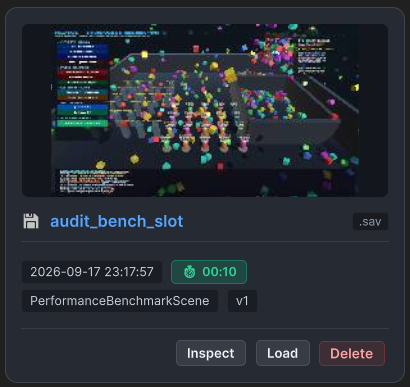
Modern games rarely present players with a raw text list of save files. Players expect rich Save Slot Cards showing:
- A visual screenshot of where they saved.
- Total playtime formatted as
04h 23m 12s. - Last modified timestamp in their local timezone.
- Key gameplay stats (e.g., Level, Gold, Difficulty) without having to load the actual save data.
FuzzySave provides this out of the box through Lightweight Companion Metadata and Zero-Stall GPU Thumbnail Capture.
1. The SaveSlotMetadata Structure
Whenever a slot is saved, FuzzySave writes a lightweight companion metadata file (e.g., slot_1.meta alongside slot_1.sav).
[Serializable]public class SaveSlotMetadata{ public string slotName; public string displayName; public bool exists; public long timestampUtcTicks; public float playtimeSeconds; public string sceneName; public int sceneBuildIndex; public int saveVersion; public long sizeBytes; public string thumbnailBase64; // High-efficiency JPEG Base64 public Dictionary<string, string> summaryValues; // Fast summary stats}Formatting Utilities:
string dateStr = metadata.GetFormattedDate(); // "2026-09-17 19:45:00"string timeStr = metadata.GetFormattedTimeOnly(); // "19:45:00"string sizeStr = metadata.GetFormattedSize(); // "428.5 KB"string playStr = metadata.GetFormattedPlaytime(); // "02h 15m 43s"Fast Slot Querying:
Reading 10 large save files just to render a load menu can cause significant disk thrashing. Instead, query the companion metadata files in less than a millisecond:
// Fetches all slot metadata in parallel without loading main save payloads!List<SaveSlotMetadata> allSlots = await FuzzySaveManager.GetAllSlotMetadataAsync();2. Zero-Stall GPU Thumbnail Capture (AsyncGPUReadback)
The Problem with Texture2D.ReadPixels:
Standard Unity screenshot solutions call ReadPixels, which halts the CPU main thread until the GPU finishes rendering the current frame buffer—causing a noticeable 15ms to 40ms hitch.
The FuzzySave Solution:
FuzzySave uses Unity’s native AsyncGPUReadback API:
- Takes a copy of the screen buffer or active camera RenderTarget.
- Dispatches an asynchronous GPU readback request.
- Once the GPU completes rendering, bytes are passed to a background worker to encode into a compressed JPEG Base64 string.
- Zero rendering stalls, zero dropped frames.
Configuration in FuzzySaveSettings:
thumbnailCaptureMode:AsyncGPUReadback(Default),Synchronous,Disabled.thumbnailWidth: Default240px.thumbnailHeight: Default135px (16:9 ratio).thumbnailQuality: Default70(balanced compression).
// Manual capture API:string base64Image = await FuzzySaveManager.CaptureThumbnailBase64Async(width: 240, height: 135, quality: 70);3. Summary Field Keys
Instead of loading an entire 5MB world save just to display the player’s level and gold on the menu, mark your variables as summary keys:
- In
FuzzySaveSettings, add keys toslotSummaryFieldKeys(e.g.,"level","player_gold","difficulty"). - Or in Visual Save Studio, toggle the Summary checkmark on any mapped field.
- Programmatic lookup:
// Inspect summary values without loading the slot:SaveSlotMetadata meta = await FuzzySaveManager.GetSlotMetadataAsync("slot_1");
if (meta.summaryValues.TryGetValue("player_gold", out string goldStr)){    goldText.text = $"Gold: {goldStr}";}
4. Practical Implementation: Building a Save Slot Card
using UnityEngine;using UnityEngine.UI;using FuzzyLogicLabs.FuzzySave;using System;
public class SaveSlotCardUI : MonoBehaviour{    [SerializeField] private RawImage m_ThumbnailImage;    [SerializeField] private Text m_TitleText;    [SerializeField] private Text m_PlaytimeText;    [SerializeField] private Text m_DateText;    [SerializeField] private Text m_SummaryText;
    public async void PopulateCard(string slotName)    {        SaveSlotMetadata meta = await FuzzySaveManager.GetSlotMetadataAsync(slotName);
        if (!meta.exists)        {            m_TitleText.text = $"{slotName} (Empty)";            m_ThumbnailImage.gameObject.SetActive(false);            return;        }
        m_TitleText.text = string.IsNullOrEmpty(meta.displayName) ? meta.slotName : meta.displayName;        m_PlaytimeText.text = $"Playtime: {meta.GetFormattedPlaytime()}";        m_DateText.text = $"Saved: {meta.GetFormattedDate()}";
        // Restore Thumbnail from Base64        if (!string.IsNullOrEmpty(meta.thumbnailBase64))        {            byte[] imageBytes = Convert.FromBase64String(meta.thumbnailBase64);            Texture2D tex = new Texture2D(2, 2);            if (tex.LoadImage(imageBytes))            {                m_ThumbnailImage.texture = tex;                m_ThumbnailImage.gameObject.SetActive(true);            }        }
        // Display Summary Stats        if (meta.summaryValues.TryGetValue("level", out string level))        {            m_SummaryText.text = $"Level: {level}";        }    }}
Next Chapter
Proceed to 09. Cloud Synchronization to explore multi-provider cloud saves and conflict resolution strategies.