08. Master Dashboard: Settings & Pro
← Previous: Master Dashboard: Insights & Analytics | Main Overview | Next: Multilingual Typography & Localization →
Tab 5: System Settings & Pro Engine
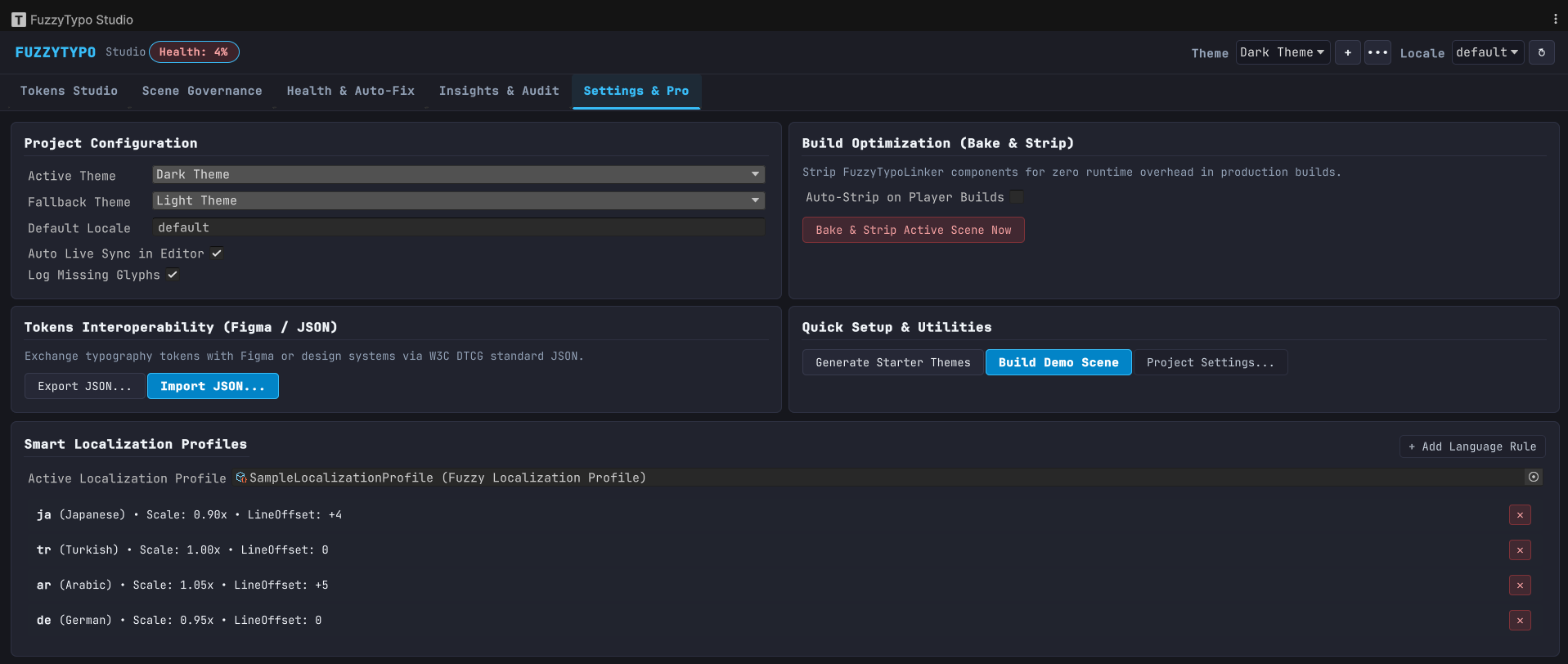
The final tab of the Master Dashboard, Settings & Pro, is where global configuration parameters are administered, industry-standard JSON Design Tokens (Figma / W3C DTCG) are exchanged, and release optimizations such as Bake & Strip are configured.
1. Build Optimization: Bake & Strip (Pro Engine)
In console, mobile, or AAA game architectures, unnecessary scripts and component overhead must be eliminated from final builds.
The Bake & Strip Logic:
- During development (Editor Mode),
FuzzyTypoLinkercomponents provide live synchronization and design agility. - When compiling player release builds, final resolved typographic properties are written permanently into
TMP_Textcomponents (Bake), and allFuzzyTypoLinkerinstances are completely removed (Strip). - Result: Zero additional memory overhead and zero script overhead on end-user runtime devices!
flowchart LR
    DevMode["Development Mode:\nFuzzyTypoLinker + Live Sync"] --> BuildProcess["Player Build Pipeline\n(IProcessSceneWithReport)"]
    BuildProcess --> BakeValues["1. Styles Baked Permanently to TMP_Text"]
    BakeValues --> StripComponents["2. Linker Components Stripped from Scenes"]
    StripComponents --> FinalPlayer["Production Release Build:\n0 Extra Memory & 0 Script Overhead!"]
Configuration Options:
- Auto-Strip on Player Builds: When enabled, the
FuzzyBakeAndStripProcessorexecutes automatically during the Unity build pipeline. - Bake & Strip Active Scene Now: Executes this process manually within the editor on the currently open scene (full
Ctrl+Zundo supported).
2. Design Tokens Interoperability (Figma / W3C JSON)
Communicating with design teams working in Figma, Penpot, or web-based design systems is streamlined through the W3C Design Tokens Community Group (DTCG) format.
Features:
- Export JSON (
btn-export-tokens-json): Exports all styles, colors, font sizes, and metric margins from the active theme into a clean JSON structure. - Import JSON (
btn-import-tokens-json): Imports JSON files exported from Figma or Tokens Studio. Detects matching typefaces in your project and integrates tokens into the theme.
Sample Token JSON Format:
{ "themeName": "Dark Theme", "formatVersion": "1.0", "tokens": [ { "id": "c7e48b9a-12d4-4f90-a3bc-91e847c2a110", "name": "H1 / Hero Display", "category": "Headings", "fontAssetName": "LiberationSans SDF", "fontSize": 38.0, "colorHex": "#FFFFFFFF", "fontStyle": "Bold", "alignment": "TopLeft", "characterSpacing": 0.0, "lineSpacing": 0.0 } ]}3. Quick Setup & Starter Assets
- Generate Starter Themes: Generates fully configured
SampleDarkThemeandSampleLightThemeassets in seconds. - Build Demo Scene: Constructs an interactive showcase scene featuring 75+ realistic UI elements (combat HUDs, inventory panels, multilingual quest logs, and settings dialogues).
- Project Settings: Fast shortcut directly into Unity’s
Edit > Project Settings > FuzzyTypopane.
4. Smart Localization Profiles
The lower section of the tab manages project-wide language scaling and font remapping rules:
- + Add Language Rule: Adds a new locale rule (e.g.,
jafor Japanese orarfor Arabic). - Configure default Fallback Fonts, Material Presets, Font Size Multipliers (
FontSizeMultiplier), and Line Spacing Offsets (LineSpacingOffset) on a per-locale basis. - For complete details on multilingual setups, proceed to the next chapter.
← Previous: Master Dashboard: Insights & Analytics | Main Overview | Next: Multilingual Typography & Localization →