05. Master Dashboard: Scene Governance
← Previous: Master Dashboard: Tokens Studio | Main Overview | Next: Master Dashboard: Health & Auto-Fix →
Tab 2: Scene & Prefab Governance Manager
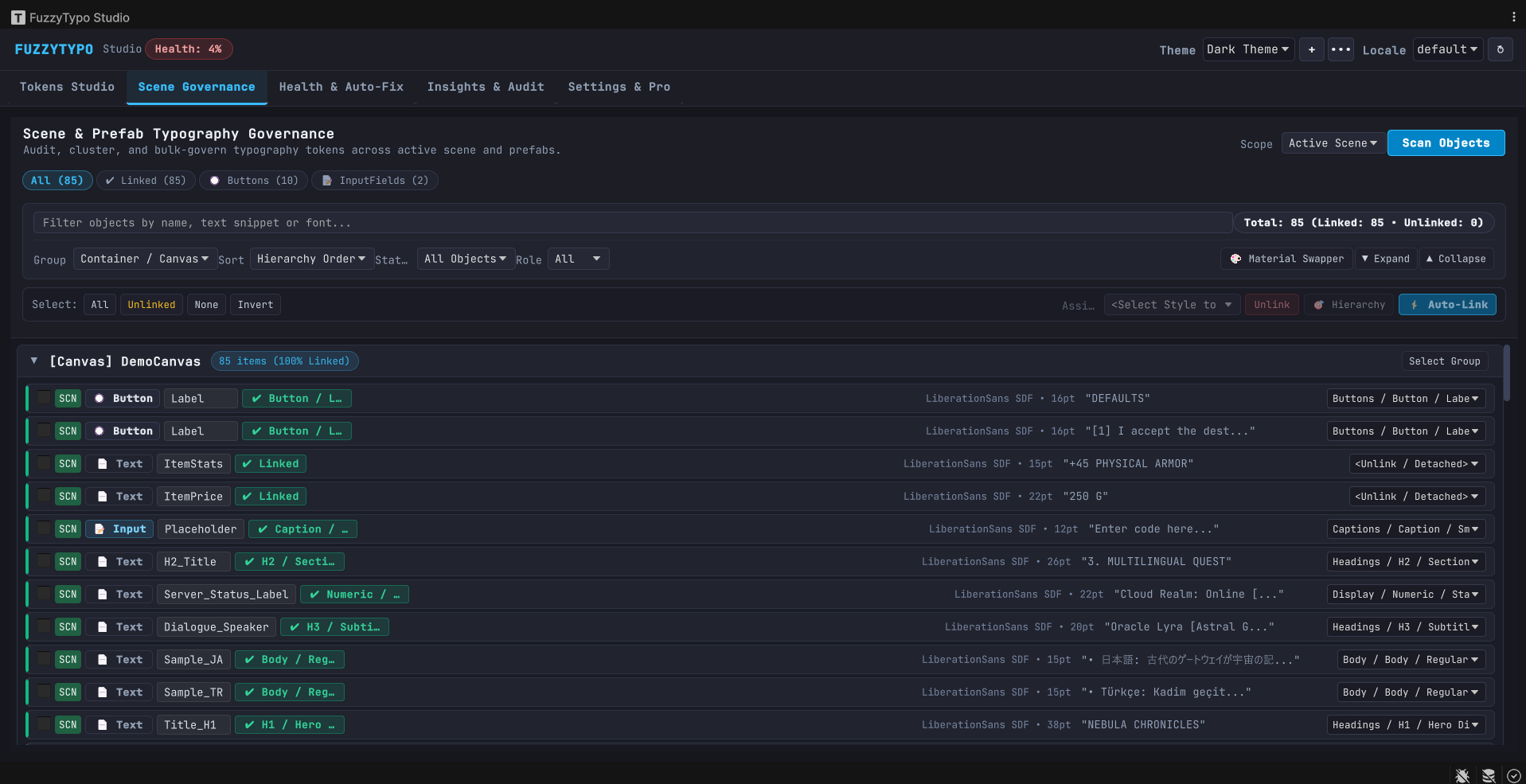
The second tab of the Master Dashboard, Scene Governance, indexes and clusters every TMP_Text component across your open scene or project prefabs, providing bulk governance and auditing capabilities.
flowchart TD
    ScanBtn["Scan Objects Button"] --> Scanner["Hierarchy & Prefab Scanner"]
    Scanner --> RoleDetector["Hierarchical Context Roles Analyzer"]
    RoleDetector --> ClusteredList["Clustered & Paginated Objects List"]
    ClusteredList --> MultiSelect["Batch Selection Toolbar"]
    MultiSelect --> AutoLink["⚡ Smart Auto-Link"]
    MultiSelect --> BatchAssign["Batch Style Assignment"]
    MultiSelect --> PingHierarchy["🎯 Multi-Select in Unity Hierarchy"]
Scanning Scope & Filtering Controls
The top control panel defines audit depth and filtering criteria:
- Audit Scope:
Active Scene: Scans text components strictly within the active loaded scene.Selected Hierarchy: Scans descendants of a selected GameObject (e.g., a specific parent Canvas or UI panel).Project Prefabs: Scans all UI prefab assets stored on disk.
- Facet Filter Chips:
Filter by categorical states with one click:All,Unlinked(not bound to FuzzyTypo),Linked(bound),Buttons,Inputs, etc. - Search Field: Fast instantaneous search by GameObject name, text content snippet, or assigned typeface.
Hierarchical Context Roles Detection
Rather than acting as a simple flat text scanner, FuzzyTypo leverages the FuzzyHierarchyContextUtility engine.
By evaluating up to 4 ancestral parent levels in the Unity hierarchy, FuzzyTypo automatically identifies what UI component role the text belongs to:
| Detected Role | Badge | Parent Component Identified |
|---|---|---|
| Button | [Button] | UnityEngine.UI.Button |
| InputField | [InputField] | TMP_InputField or UnityEngine.UI.InputField |
| Toggle | [Toggle] | UnityEngine.UI.Toggle |
| Dropdown | [Dropdown] | TMP_Dropdown or UnityEngine.UI.Dropdown |
| Slider | [Slider] | UnityEngine.UI.Slider |
| ScrollRect | [ScrollRect] | UnityEngine.UI.ScrollRect |
| Generic | [Generic] | Independent text label or dialogue string |
Smart Auto-Link
One of Scene Governance’s most powerful productivity features is the Smart Auto-Link engine:
- Identifies all Unlinked text instances in the scanned scope.
- Evaluates the text’s detected context role (
Button,InputField, etc.) alongside its current font size. - Automatically maps the most appropriate
FuzzyTextStyletoken from the active theme. - Attaches a
FuzzyTypoLinkerand applies the style in a single batch operation.
[!TIP] For instance, a text element with a font size of 16 situated inside a
Buttonparent is automatically matched with theButtons / Button Labeltoken. Complex multi-screen UI projects can be fully onboarded into your design system in seconds!
Power Multi-Selection Toolbar
Select individual items using row checkboxes, or take advantage of fast selection shortcuts:
- Selection Shortcuts:
All: Selects all filtered items.Unlinked: Selects only unlinked items with one click.None: Clears current selection.Invert: Inverts the selection mask.
- Batch Operations:
- Assign Dropdown: Assigns a specified style token to all selected objects simultaneously.
- Unlink Button: Safely removes
FuzzyTypoLinkercomponents from selected GameObjects. - 🎯 Hierarchy Button: Selects all matching GameObjects directly within Unity’s native Hierarchy window.
High-Performance Pagination Engine
In large RPG, MMO, or simulation projects containing thousands of text elements, rendering all items in a single list could cause editor interface hitching.
FuzzyTypo includes a built-in pagination engine (scene-pagination-bar):
- Items Per Page: Display
25,50,100, orAllentries. - Fast Navigation:
◀ PrevandNext ▶controls. - Memory Efficient: Only items on the active page are rendered, preserving a silky-smooth 60+ FPS editor experience.
Integrated Material Swapper Drawer
Clicking the 🎨 Material Swapper button in the toolbar opens a sliding utility drawer:

- Filter by specific typeface (e.g.,
LiberationSans SDF). - Pick a target Material Preset (e.g.,
Gold Outline Glow Material) and click Execute Swap to rebind materials across all matched text instances at once.
← Previous: Master Dashboard: Tokens Studio | Main Overview | Next: Master Dashboard: Health & Auto-Fix →